
How to Point a Root Domain to a Brilliant Directories Website
Link: https://support.brilliantdirectories.com/support/solutions/articles/12000110337
A root domain, such as example.com, is the domain name without www. or any other subdomain in front. This article covers the record for the root domain on the Point Domain stage of the connection wizard. For the full connection steps, see How to Connect a Domain to a Brilliant Directories Website.
The method for the root domain depends on the company that runs the domain's DNS and, for GoDaddy, on the How should your address appear? choice from the Check It stage: With www. or Without www..
Unless the domain uses Brilliant Directories nameservers, it also needs the www record, which is the same at every DNS provider:
Type: CNAME
Name: www
Value: The site's unique directoryup.com target copied from Domain Manager
Why the root domain is different
DNS does not allow an ordinary CNAME record on the root of a domain (the record named @), so the root domain is connected differently depending on the company that runs the domain's DNS. The Point Domain stage identifies that company from the domain's nameservers and shows the matching method below: a CNAME on Cloudflare, Domain Forwarding on GoDaddy when the address uses www, an ALIAS record on Namecheap, and an A record for any other DNS provider or when the provider cannot be identified. An A record works everywhere, but it points at a fixed server address; the Cloudflare, GoDaddy, and Namecheap methods keep the domain following the website if it moves to a different server.
Brilliant Directories nameservers
Nothing needs to be added. The Point Domain stage reports We manage the DNS for the address, and the records are created during the switch.
Cloudflare
Cloudflare flattens a CNAME on the root, so the root takes the same record as www. Delete the existing root and www records first, then add both of these:
Type: CNAME
Name: @ (the root domain, example.com)
Value: The site's unique directoryup.com target
Type: CNAME
Name: www
Value: The site's unique directoryup.com target
When the Cloudflare account is connected to Domain Manager, Use a domain from my Cloudflare account or Add this record for me creates these records automatically.
GoDaddy
GoDaddy does not allow a CNAME record on the root of a domain. With With www., connect it in two steps:
- Edit the existing www record so it is a CNAME pointing to the site's unique directoryup.com target.
- Turn on Domain Forwarding so example.com forwards to https://www.example.com: in GoDaddy's DNS settings for the domain, open Forwarding, click Add Forwarding, choose https://, enter www.example.com, select Permanent (301), and click Save.
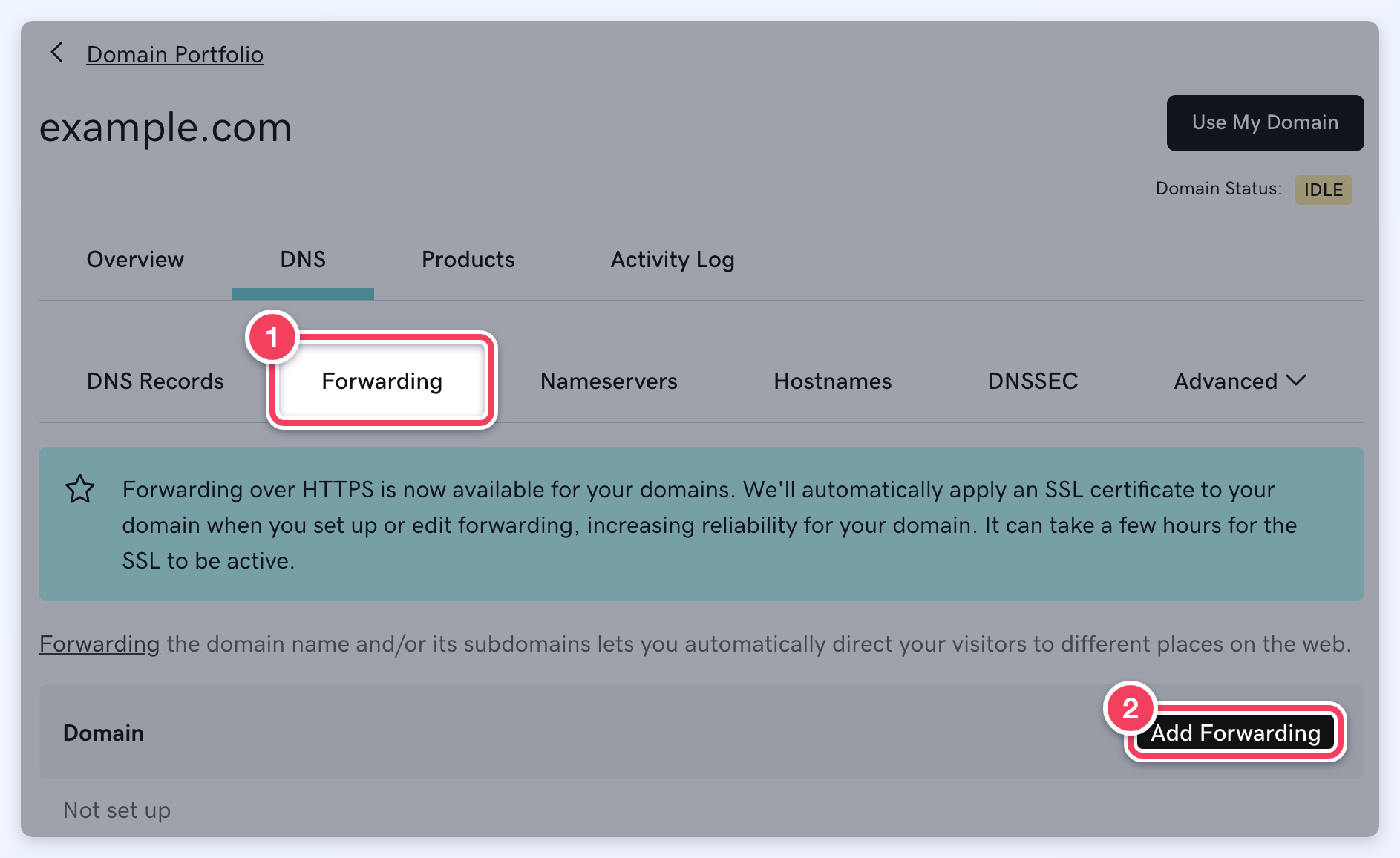
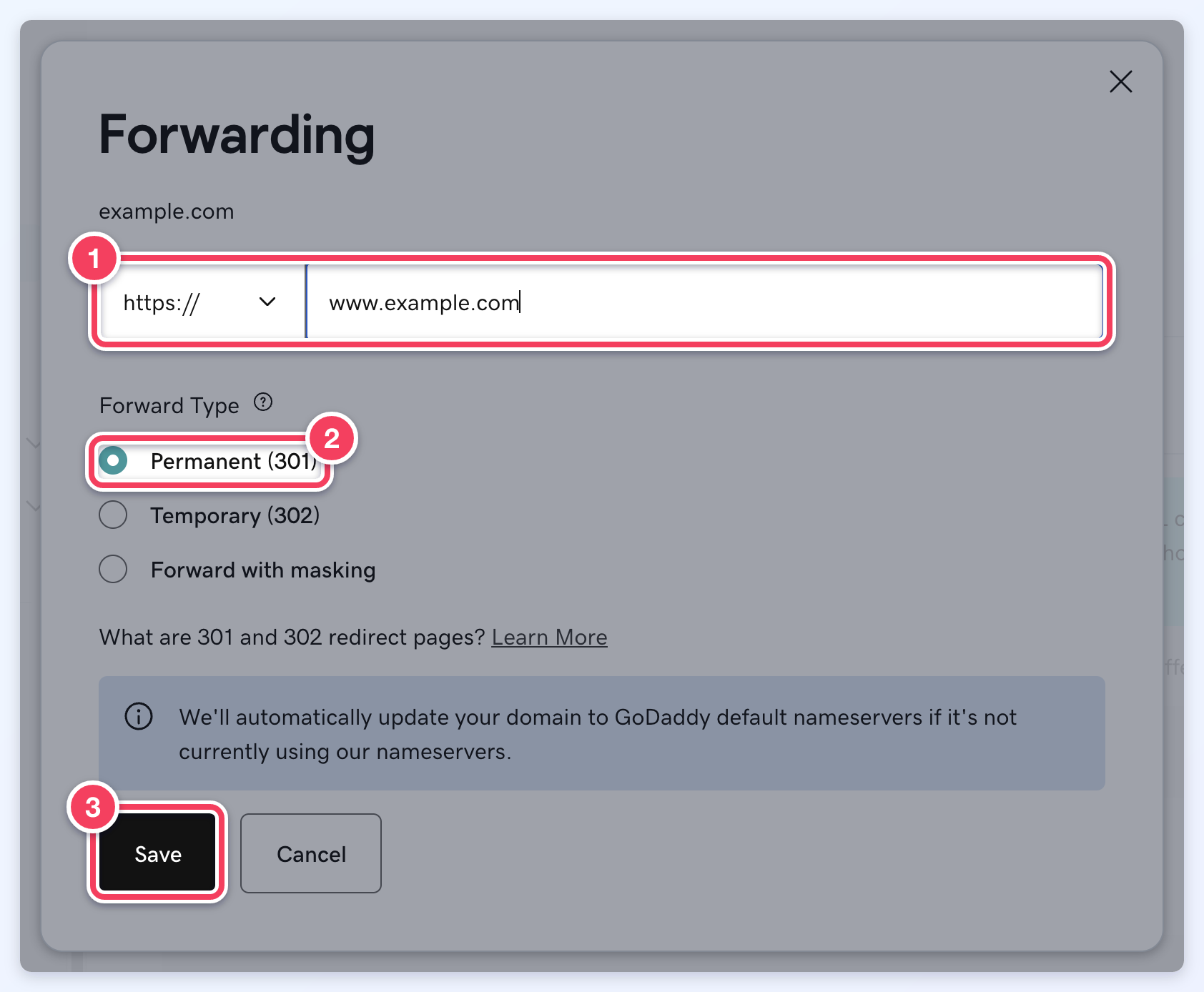
GoDaddy's Forwarding settings: forward the root domain to the https www address, permanently (301).
The Point Domain stage shows this forwarding in place of a root record, with a link to GoDaddy's guide. Once example.com forwards permanently (301) to https://www.example.com, the root domain reads Pointed on the Point Domain and Switch Over stages.
With Without www., do not turn on Domain Forwarding for the root domain: the website already sends www visitors to example.com, so a forward the other way sends visitors in a circle and the site stops loading. Add an A record for the root instead, alongside the www CNAME:
Type: A
Name: @ (the root domain, example.com)
Value: The server address shown for the root domain on the Point Domain stage
An A record points at a fixed address, so if the website moves to a different server in the future, that one record needs the same update.
Namecheap
Namecheap supports an ALIAS record on the root of a domain. Namecheap does not allow an ALIAS record alongside an existing A, AAAA, CNAME, or redirect record for the same host, so delete the current root domain record first, then use Add New Record to create:
Type: ALIAS
Name: @ (the root domain, example.com)
Value: The site's unique directoryup.com target
Type: CNAME
Name: www
Value: The site's unique directoryup.com target
Namecheap's guide: How to create an ALIAS record.
Other DNS providers
Add the www CNAME above, and an A record for the root domain:
Type: A
Name: @ (the root domain, example.com)
Value: The server address shown for the root domain on the Point Domain stage
An A record points at a fixed address, so if the website moves to a different server in the future, that one record needs the same update. For the long term, moving the domain's DNS to a free Cloudflare account avoids this, because Cloudflare can hold the site's target on the root domain; see Connecting a Site to Cloudflare.
