
Settings » Domain Manager » Usage and Storage Cleanup
Link: https://support.brilliantdirectories.com/support/solutions/articles/12000098735
The Usage tab in Settings > Domain Manager shows how much of the website's plan is in use and provides a storage breakdown and cleanup tools.
Before starting
The administrator must have permission to view website resources. Download any export or backup files that must be retained before running cleanup.
Review plan usage
- Open Settings > Domain Manager > Usage.
- Review How much of your plan you are using.
- Click Refresh to update the displayed figures.
The card includes members, the current month's bandwidth, and storage. A sent-email allowance appears where applicable; it can be daily or monthly depending on the site's email arrangement. Private-server administrators may also see Server usage. Use Increase Limit beside an allowance to review options for more capacity.
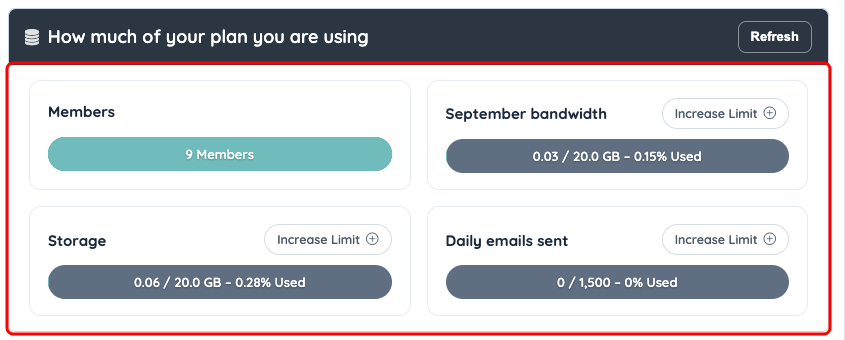
The Usage tab compares current consumption with the website’s plan limits.
Measure storage
- Find What is using your storage.
- Click Measure.
- Review the returned breakdown before choosing a cleanup action.
Storage measurement helps distinguish files, mail, and database use. A mailbox consuming space needs a different response from old export files.
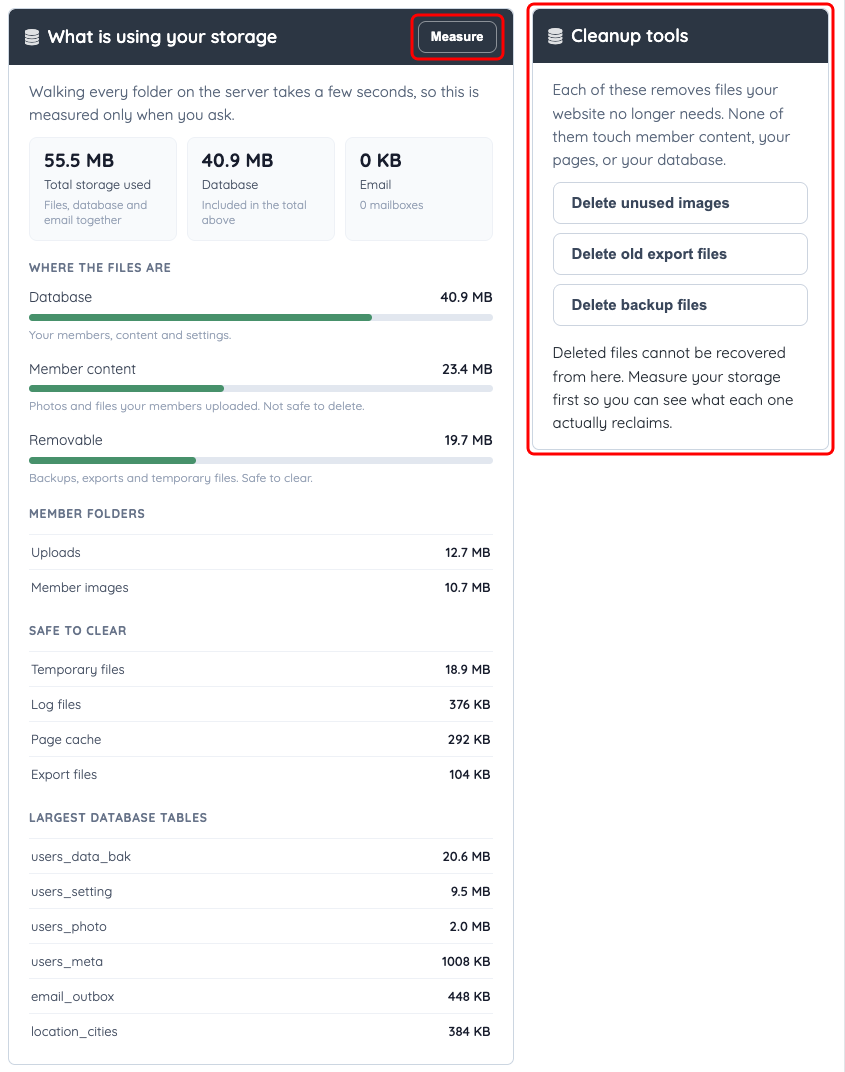
Measure storage before choosing a cleanup action. The displayed figures are an example from an internal test website. The folder breakdown depends on the server; where it is unavailable, the panel says Folder detail is not available on this server and still reports the database and email totals.
Use the cleanup tools
| Action | What it removes |
|---|---|
| Delete unused images | Image files no longer referenced by members, posts, or listings. |
| Delete old export files | Saved CSV and spreadsheet export files. Download any files still needed first. |
| Delete backup files | Backup archives stored in the website account. Server-level backups are separate. |
The Domain Manager cannot undo these deletions. Read the selected action’s scope and retain any necessary files before confirming.
- Select the cleanup action that matches the measured storage use.
- Review its confirmation message.
- Confirm only the intended deletion.
- Wait for the action to finish.
- Review the refreshed storage measurement.
These cleanup controls are intended for the named file categories, rather than deleting member records, web pages, or database content. For high bandwidth use, see How to Optimize the Bandwidth Usage of a Site. For mailbox storage, use Mailboxes.
