
Email Template Variables
Link: https://support.brilliantdirectories.com/support/solutions/articles/12000076757
Email template variables are placeholders that automatically insert website, member, post, or invoice information into an email when it is sent.
Variables are commonly used to personalize emails, add member-specific details, include website information, display invoice data, or link to related records..
Email template variables are divided into four main reference categories:
- Member Variables
- Post Variables
- Website Variables
- Invoice Variables
How Email Variables Work
Email template variables use a specific placeholder format, such as %%%first_name%%%.
When the email is sent, the system replaces the variable with the matching information from the website, member, post, or invoice record.
For example, adding the following variable to an email template:
%%%first_name%%%Will display the recipient’s first name when the email is sent, as long as the email has access to the matching member record.
If the system cannot find matching information for a variable, the value may display blank.
Find Email Variables
Email template variables are available from the {} Variables option in the Froala editor toolbar.
- Go to Emails >> Email Templates.
- Click the {} Variables option in the editor toolbar.
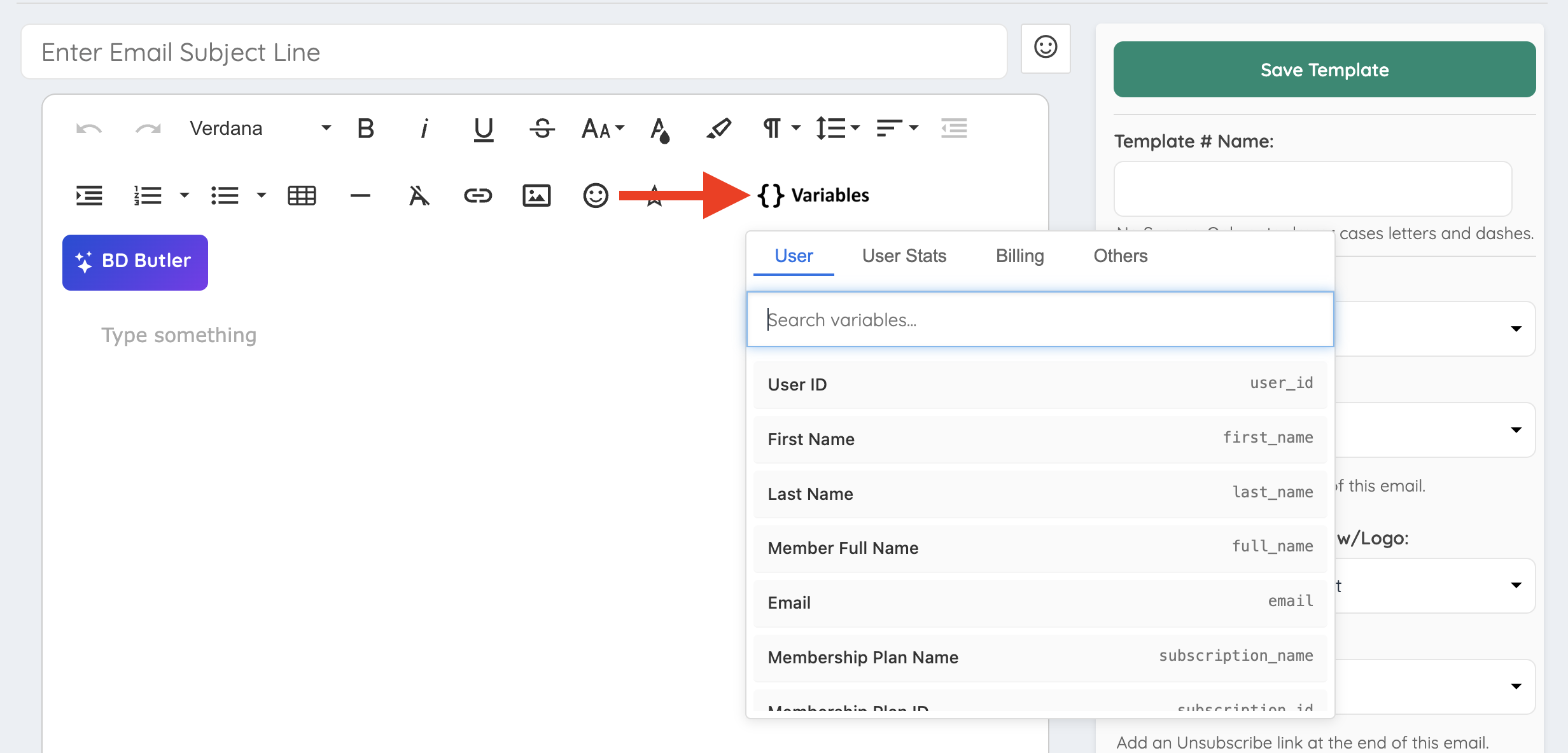
The selected variable will be added to the email template content and replaced with the matching information when the email is sent.
Important Notes Before Using
- Variables only display information when the email has access to the matching data.
- Member variables should be used in emails connected to a member record.
- Post variables should be used in emails connected to post content.
- Website variables can be used to display general website details.
- Invoice variables should be used in billing or invoice-related emails.
- If the system cannot find matching information for a variable, the value may display blank.
Member Variables
Member variables insert information from a member account or listing.
| Variable Name | Placeholder | Description |
|---|---|---|
| User ID | %%%user_id%%% | The unique numeric ID assigned to the member. |
| First Name | %%%first_name%%% | The member’s first name. |
| Last Name | %%%last_name%%% | The member’s last name. |
| Member Full Name | %%%full_name%%% | The member’s full name. |
%%%email%%% | The email address associated with the member account. | |
| Company | %%%company%%% | The company name associated with the member listing. |
| Phone Number | %%%phone_number%%% | The primary phone number associated with the member listing. |
| Address 1 | %%%address1%%% | The main address associated with the member listing. |
| Address 2 | %%%address2%%% | The secondary address line associated with the member listing. |
| City | %%%city%%% | The city associated with the member listing. |
| Zip Code | %%%zip_code%%% | The zip code or postal code associated with the member listing. |
| State Code | %%%state_code%%% | The state code associated with the member listing. |
| State Ln | %%%state_ln%%% | The state value associated with the member listing. |
| Country Code | %%%country_code%%% | The country code associated with the member listing. |
| Country Ln | %%%country_ln%%% | The country value associated with the member listing. |
| Website | %%%website%%% | The website URL associated with the member listing. |
| Blog Link | %%%blog%%% | The blog link associated with the member listing. |
| Membership Plan ID | %%%subscription_id%%% | The membership plan ID associated with the member listing. |
| Membership Plan Name | %%%subscription_name%%% | The member’s current membership plan name. |
| Previous Membership Plan Name | %%%previous_subscription_name%%% | The member’s previous membership plan name. This is commonly used in upgrade-related email templates. |
| Member Profile URL | %%%filename%%% | The member’s profile URL path. |
| Full Member Profile URL | %%%protocol_website_url%%%/%%%filename%%% | The full website URL plus the member’s profile URL path. |
| Active | %%%active%%% | The member listing status. |
| Signup Date | %%%signup_date%%% | The date the member listing was created. |
| Signup Date Formatted | %%%signup_date_format%%% | The formatted signup date. |
| Last Login | %%%last_login%%% | The member’s last login date. |
| Last Login Format | %%%last_login_format%%% | The member’s last login date using the website’s selected date format. |
| Position | %%%position%%% | The position or title associated with the member listing. |
| Profession ID | %%%profession_id%%% | The top-level category ID associated with the member listing. |
| Verified | %%%verified%%% | Displays whether the listing has been manually verified. |
| Nationwide | %%%nationwide%%% | Displays whether the member listing is set to serve nationwide. |
| Listing Type | %%%listing_type%%% | Displays whether the listing represents an individual or a company. |
Post Variables
Post variables insert information connected to post content.
| Variable Name | Placeholder | Description |
|---|---|---|
| Multi-Image Post Title | %%%group_name%%% | The title of the post. |
| Chat Message Content | %%%chat_message_content%%% | The content of the chat message associated with the email. |
Website Variables
Website variables insert general information from the website settings.
| Variable Name | Placeholder | Description |
|---|---|---|
| Website Name | %%%website_name%%% | The website name added in the website settings. |
| Website Domain | %%%website_url%%% | The website domain. |
| http(s) + Domain | %%%protocol_website_url%%% | The website domain with the correct protocol. |
| Website Logo | %%%website_logo%%% | The path to the website logo image. |
| Website Email | %%%website_email%%% | The website email address added in the website settings. |
| Website Phone | %%%website_phone%%% | The website phone number added in the website settings. |
| Country | %%%country%%% | The primary country added in the website settings. |
| Profession | %%%profession%%% | The profession added in the website settings. |
| Industry | %%%industry%%% | The industry added in the website settings. |
| LinkedIn Link | %%%linkedin%%% | The LinkedIn account associated with the website. |
| Twitter Link | %%%twitter%%% | The Twitter account associated with the website. |
| Instagram Link | %%%instagram%%% | The Instagram account associated with the website. |
| Facebook Link | %%%facebook_page%%% | The Facebook page associated with the website. |
| Pinterest Link | %%%pinterest%%% | The Pinterest account associated with the website. |
| Google Plus Link | %%%google_profile%%% | The Google profile link associated with the website. |
| YouTube Link | %%%youtube%%% | The YouTube account associated with the website. |
| Currency | %%%currency_code%%% | The currency code selected in the website settings. |
| Distance | %%%distance%%% | The distance format selected for the website. |
| Origin URL | %%%url_origin%%% | The URL where the message was generated. |
Note: Some legacy variables may still appear for older websites or older email templates.
Invoice Variables
Invoice variables insert billing and invoice information. These variables should be used in invoice-related email templates.
| Variable Name | Placeholder | Description |
|---|---|---|
| Invoice Number | %%%invoice_id%%% | The numeric invoice ID. |
| Membership Plan | %%%invoice_product_name%%% | The membership plan associated with the invoice. |
| Invoice Due Date | %%%invoice_due_date%%% | The invoice due date. |
| Invoice Date Paid | %%%invoice_date_paid%%% | The date the invoice was paid. |
| Invoice Status | %%%invoice_status%%% | The current status of the invoice. |
| Billing Cycle | %%%invoice_billing_cycle%%% | The billing cycle associated with the invoice. |
| Promo Code | %%%invoice_promo_desc%%% | The promo code information associated with the invoice, when applicable. |
| Invoice Total | %%%invoice_total%%% | The total amount listed on the invoice. |
| Invoice PDF Link | %%%invoice_pdf_link%%% | A link to download the PDF version of the invoice. |
Example Uses
Personalized Greeting
Use a member variable to greet the recipient by first name:
Hello %%%first_name%%%,Website Contact Information
Use website variables to display the website email address and website URL:
Contact us at %%%website_email%%% or visit %%%protocol_website_url%%%.Member Profile Link
Use member and website variables together to create a full member profile link:
View your profile here: %%%protocol_website_url%%%/%%%filename%%%Invoice PDF Link
Use an invoice variable to link to the PDF version of an invoice:
Download your invoice here: %%%invoice_pdf_link%%%Unsupported SEO Variables
When creating SEO variables, avoid using the same name as an existing database column.
Using a database column name as an SEO variable name may cause conflicts. To prevent this, do not use the column names listed below when naming SEO variables.
type, old_filename, new_filename, updated_by, name, icon, keywords, order, group_name, database, first_name, last_name, full_name, email, company, phone_number, fax_number, address1, address2, zip_code, city, state_code, country_code, state_ln, country_ln, website, twitter, facebook, linkedin, blog, active, token, position, profession, additional, link, link_order, user_id, comments, data_name, data_type, form, form_name, search_results, h1, h2, post_type, widget, widget_name, status, title, section, filename, quote, experience, affiliation, awards, published, education, softwares, fees, about_me, featured, testimonial, preferred, work_experience, rep_matters, speaking_engagements, current_position, additional_fields, lat, lon, post_title, post_caption, post_category, post_image, post_price, post_tags, group_category, property_status, property_type, property_beds, property_baths, property_price
