
Setting up Recurring Payments
Link: https://support.brilliantdirectories.com/support/solutions/articles/12000046485
This article explains how to configure recurring membership payments, including monthly, quarterly, semi-annual, and yearly billing cycles, as well as recurring subscriptions with optional one-time setup fees.
Sometimes, admins want to add a one-time payment + a recurring subscription or they might only want a regular subscription.
If this is the case, follow these simple steps to set it up correctly:
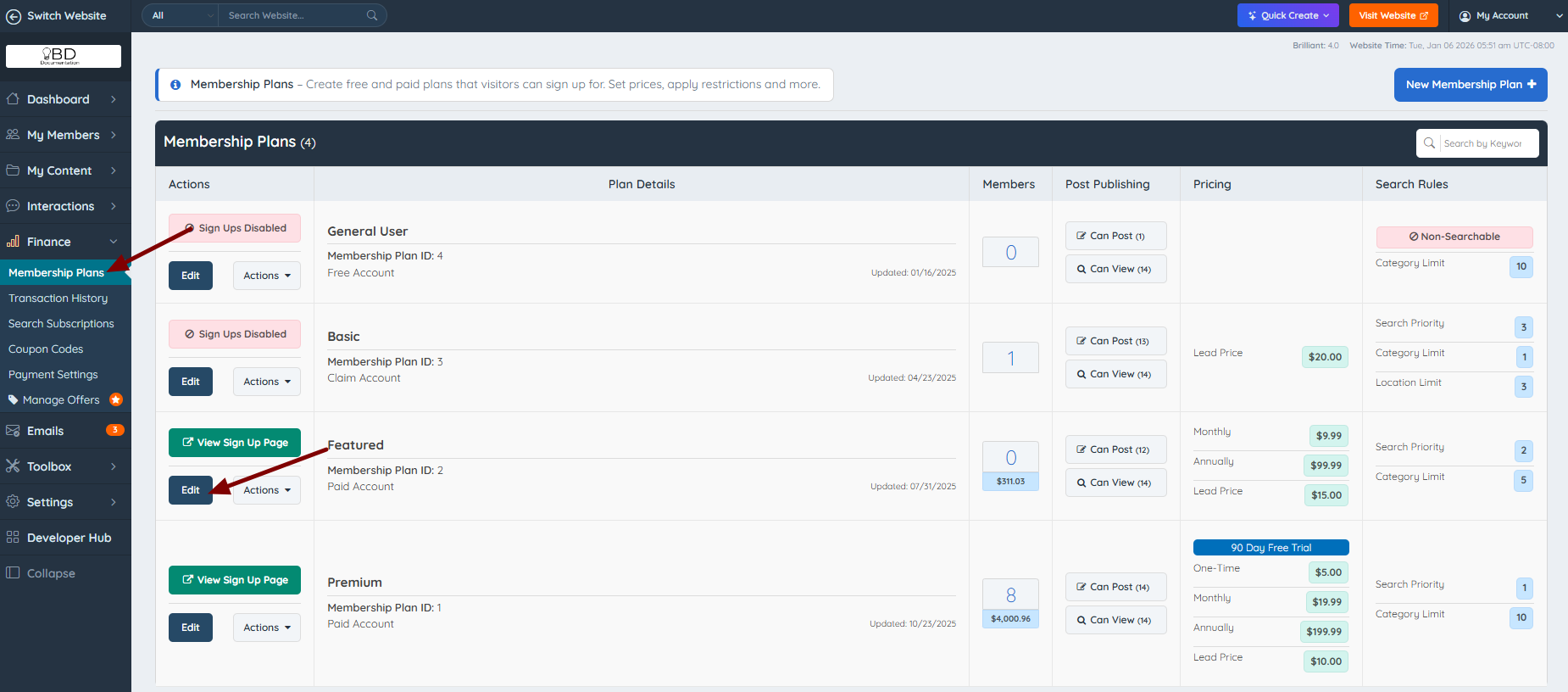
1. Go to Finance » Membership Plans and click Edit:
2. Then go to the "Sign Ups & Upgrades" tab. Scroll down and add the price of the recurring options:

Do the same if need to set up a "One-time setup fee" option + recurring payments.

3. Make sure the "Account type" says "Paid".

When the price has been set up, scroll up and click the "Sign Up Page" button:

Make sure the price is showing up correctly in the "Checkout" Form:

To create one-time payments, read this article: Setting up One Time Payments.
If Free Membership Plans need to be created, read this documentation: Setting up Free Membership Plans.
If need to edit the amounts displayed on the /join page, read these articles:
