
How To Delete a Widget
Link: https://support.brilliantdirectories.com/support/solutions/articles/12000078436
Deleting a custom widget permanently removes it from a website. This can't be undone, so be sure the widget can be removed completely before continuing.
Disabling a custom widget may be a better option if the goal is to deactivate the widget while keeping it available for future use. To learn how, refer to How To Disable a Widget.
Keep in mind that only custom or brand-new widgets can be deleted — this option does not apply to default widgets. If the deleted widget is a customized copy of a default widget, the default version automatically takes over on the live site again, bringing back default functionality.
Deleting a Widget
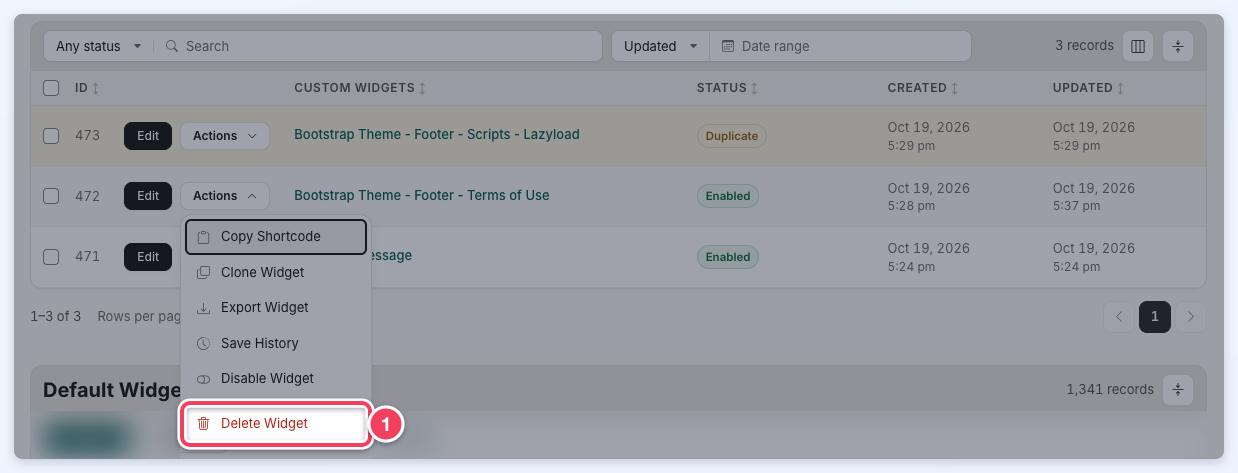
To delete a widget, go to Toolbox » Widget Manager, open the widget's Actions menu in the Custom Widgets table and click Delete Widget:
A Delete Widget confirmation pop-up shows the widget's name and warns that the custom widget is deleted from the website and that this cannot be undone. Click Delete Widget to confirm, or Cancel to keep the widget.
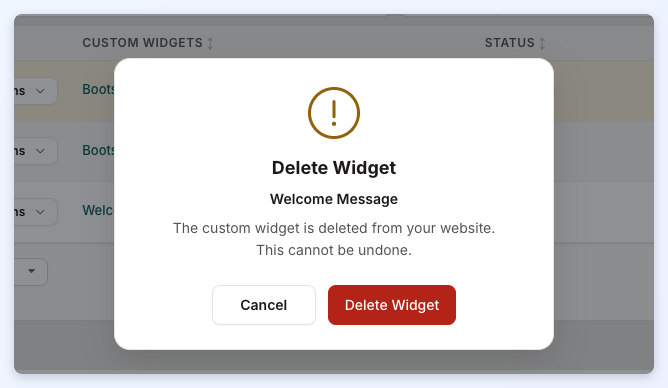
Once confirmed, the widget is removed from the website permanently and disappears from the Custom Widgets table.
To delete several custom widgets at once, see Bulk Actions for Widgets.
