
Managed SSL/HTTPS Security Certificate
Link: https://support.brilliantdirectories.com/support/solutions/articles/12000050089
Managed SSL/HTTPS Security Certificate
SSL encrypts traffic between the website and its visitors and allows the public website and payment pages to use HTTPS on the connected domain.
How to Get Managed SSL
Managed SSL is included with qualifying add-on packages and can also be purchased as the Managed SSL Security Add-On.
Connect the Domain First
The live domain must point to the website before a certificate can be issued. See How to Connect a Domain to a Brilliant Directories Website.
Installation and Status
When managed SSL is already active, Domain Manager requests a new certificate as part of Switch Over. Open Settings > Domain Manager > SSL to review its status and select Check again after DNS changes.
If managed SSL is purchased after the domain is connected, open the SSL tab and use the installation action shown there. Issuance can take time while the domain and DNS are verified.
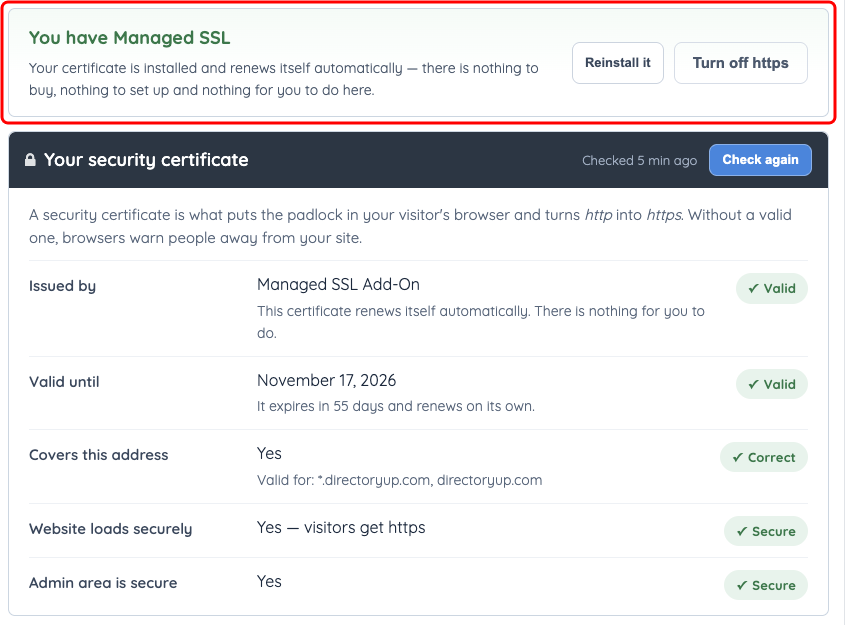
Example certificate status on a directoryup.com website. Custom-domain certificate details and available actions depend on the website configuration.
SSL activation can regenerate the HTAccess file. Back up any custom rules before installation and confirm them afterward.
A manually installed third-party certificate follows a different renewal process. See Install 3rd Party SSL.
