
Settings » General Settings » Localization
Link: https://support.brilliantdirectories.com/support/solutions/articles/12000042159
The Localization tab of the General Settings page sets where the website is based and how it speaks to visitors: the primary country, the website language, distances, dates and times, the time zone, and how prices and currency show.
Open it from Settings » General Settings, then click the Localization tab. The tab is split into three sections, listed in the side menu: Country and Language, Date and Time and Currency. Click a section in the side menu to jump to it. The layout of the page and how changes are saved are explained in Settings » General Settings Tab.
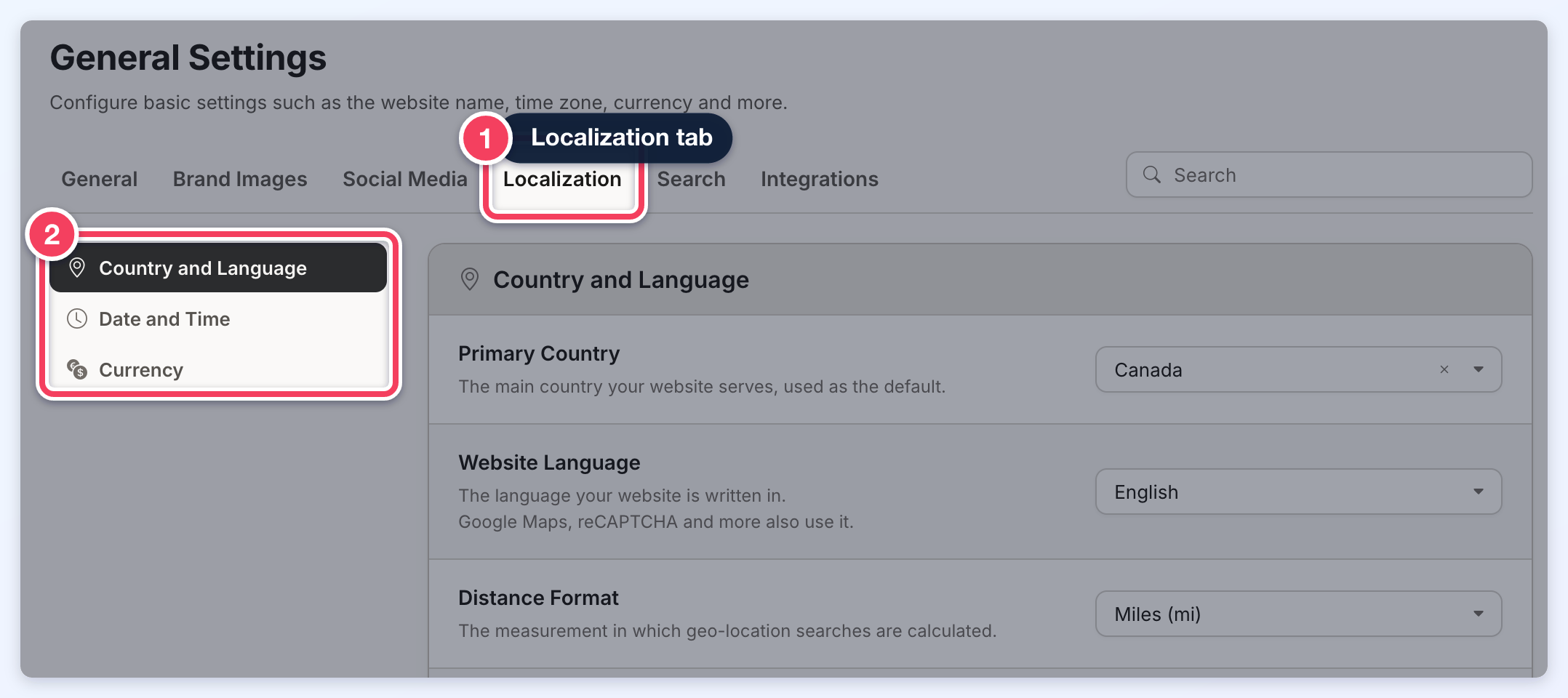
Changes are not saved one by one: after a change, a bar with Discard and Save appears at the top of the page. Click Save to keep the changes.
Country and Language
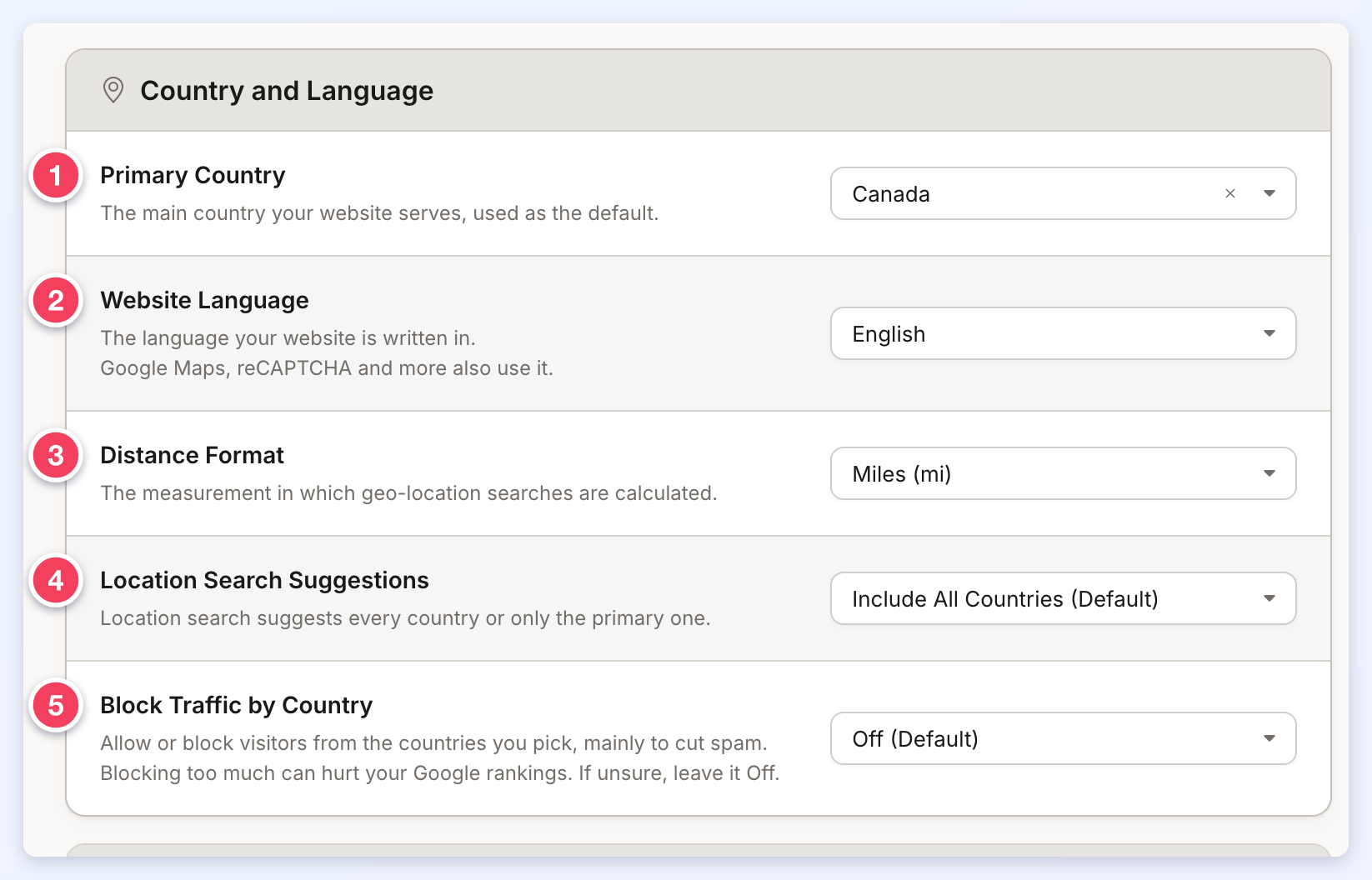
- Primary Country: the main country the website serves. It is the country the system falls back on, and the one suggested to visitors for their location. Click the box and type to find a country quickly. It may also be necessary to check the countries in the Finance section: Finance » Payment Gateways » Additional Settings » Billing Address Countries.
- Website Language: the language the website is written in. Besides the website itself, it sets the language used by:
- the Google reCAPTCHA checkbox on forms: Guide 8. How to Enable Form Security with Google reCaptcha;
- the Google location suggestions in search boxes: Google Maps API: Features, Functions, and Key Considerations;
- the events calendar: Events Calendar.
- Distance Format: Miles (mi) or Kilometers (km). Location searches measure and show the distance to each member in this unit. EG a visitor searches for location X; there are no members there, but there is one in location Z. The search results show how far Z is from X, in miles or kilometers.
- Location Search Suggestions: Include All Countries (Default) suggests locations in every country as visitors type in a location search box. Only Search within Primary Country suggests only locations in the Primary Country, which also becomes the region used when the system looks up a location with Google Maps. With this option on, these instructions help localize the search further: How to Localize the Website.
- Block Traffic by Country: allows or blocks visitors from chosen countries, mainly to cut spam. Off (Default) blocks nobody. Only Allow These Countries and Block These Countries each show a second box where the countries are picked. Blocking too much can hurt the website's Google rankings, so when unsure, leave it Off. This setting shows only when the Block Website Traffic by Country add-on is active.
Translating Text Labels and Emails
When a different Website Language is chosen, and it is one of the languages listed below, the Also use for text labels and emails checkbox appears under it. Tick it, then click Save, to translate the website's text labels and email templates into that language. Every part of the website that uses text labels then shows in that language.

Menus such as the header menu and the main menu do not use text labels, so translate their links in the Menu Manager. For a language read from right to left, also set the Advanced Setting Text Direction (system name text_direction) to right to left.
Languages that translate text labels and emails automatically:
- Albanian (sq-AL)
- Albanian (Kosovo) (sq-XK)
- Arabic (ar-AE)
- Bengali (Bangladesh) (bn-BD)
- Bulgarian (bg-BG)
- Chinese (Hong Kong) (zh-HK)
- Chinese (Simplified) (zh-CN)
- Chinese (Traditional) (zh-TW)
- Croatian (hr-HR)
- Czech (cs-CZ)
- Danish (da-DK)
- Dutch (nl-NL)
- Dutch (Belgium) (nl-BE)
- English (en-US)
- English (Australia) (en-AU)
- English (Great Britain) (en-GB)
- Filipino (tl-PH)
- Finnish (fi-FI)
- French (fr-FR)
- German (de-DE)
- Greek (el-GR)
- Hebrew (he-IL)
- Hindi (hi-IN)
- Hungarian (hu-HU)
- Indonesian (id-ID)
- Italian (it-IT)
- Japanese (ja-JP)
- Kazakh (kk-KZ)
- Korean (ko-KR)
- Malay (ms-MY)
- Mongolian (mn-MN)
- Norwegian (no-NO)
- Polish (pl-PL)
- Portuguese (pt-PT)
- Portuguese (Brazilian) (pt-BR)
- Romanian (ro-RO)
- Russian (ru-RU)
- Serbian (sr-SR)
- Slovakian (sk-SK)
- Slovenian (sl-SI)
- Spanish (Mexican) (es-MX)
- Spanish (Spain) (es-ES)
- Swedish (sv-SE)
- Thai (th-TH)
- Turkish (tr-TR)
- Ukrainian (uk-UA)
- Vietnamese (vi-VN)
Date and Time
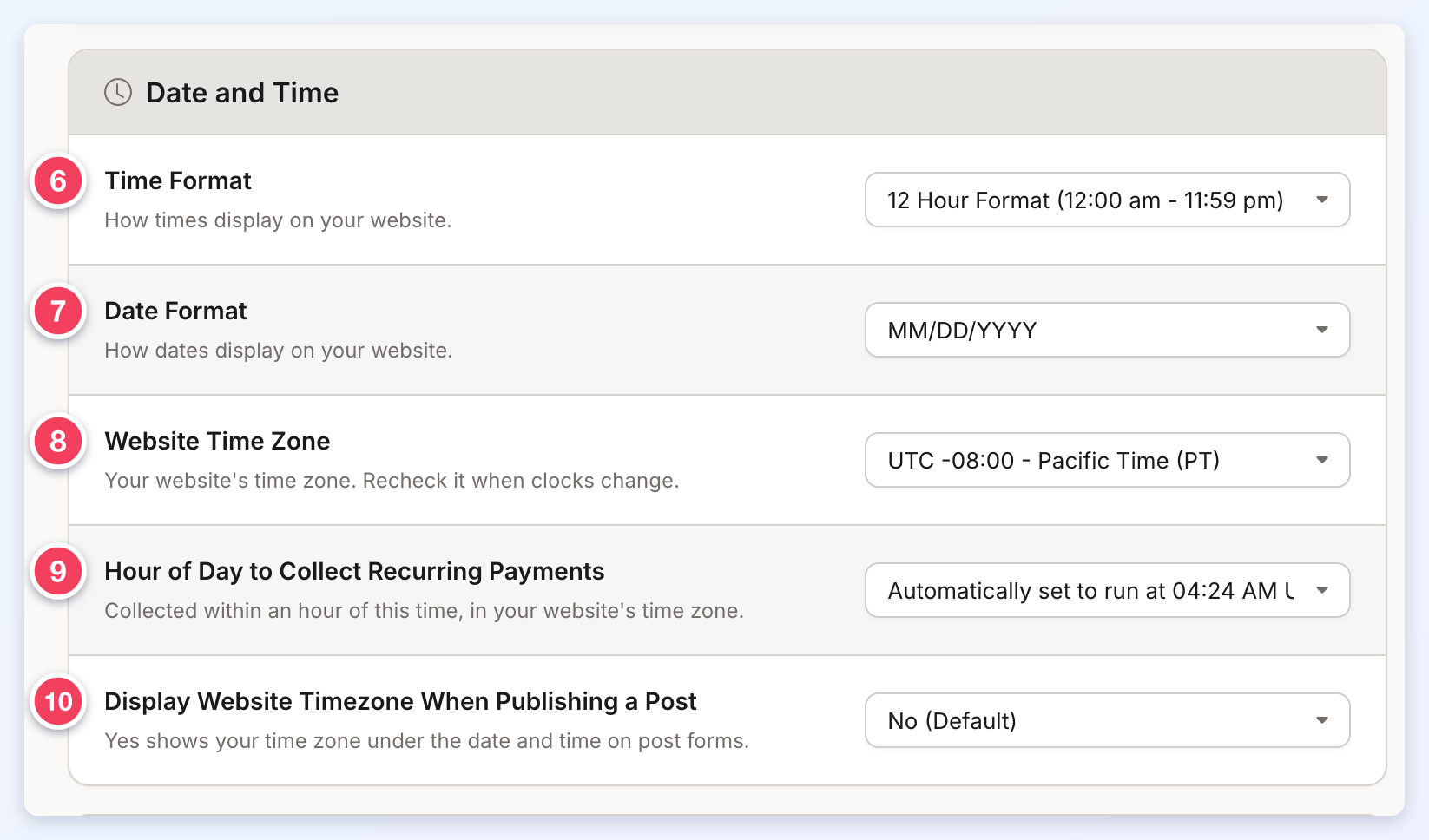
- Time Format: how times show on the website, 12 Hour Format (12:00 am - 11:59 pm) or 24 Hour Format (00:00 - 23:59).
- Date Format: how dates show on the website: MM/DD/YYYY, DD/MM/YYYY, YYYY/MM/DD, YYYY-MM-DD or DD.MM.YYYY.
- Website Time Zone: the website's time zone. It sets the time shown in the admin area, which keeps the website activity tracker accurate, and the website's own clock, so a post that expires at a set date and time expires in the right time zone. The time zone may need changing when clocks change for daylight saving time: check that it matches the current difference from GMT.
- Hour of Day to Collect Recurring Payments: the time of day recurring payments are collected, in the website's time zone. Billing runs within one hour of the selected time. The list loads a moment after the page. Until an hour is picked, it shows Automatically set to run at followed by the time the system chose for the website.
- Display Website Timezone When Publishing a Post: Yes - Enter Custom Text shows a time zone note under the date and time fields of the post forms members fill in. Choosing it shows a second field, Timezone Text for Posts, for the text members see. No (Default) shows nothing.
Currency
These settings control how the website shows prices and which currency members are charged in, for both admin and member transactions.
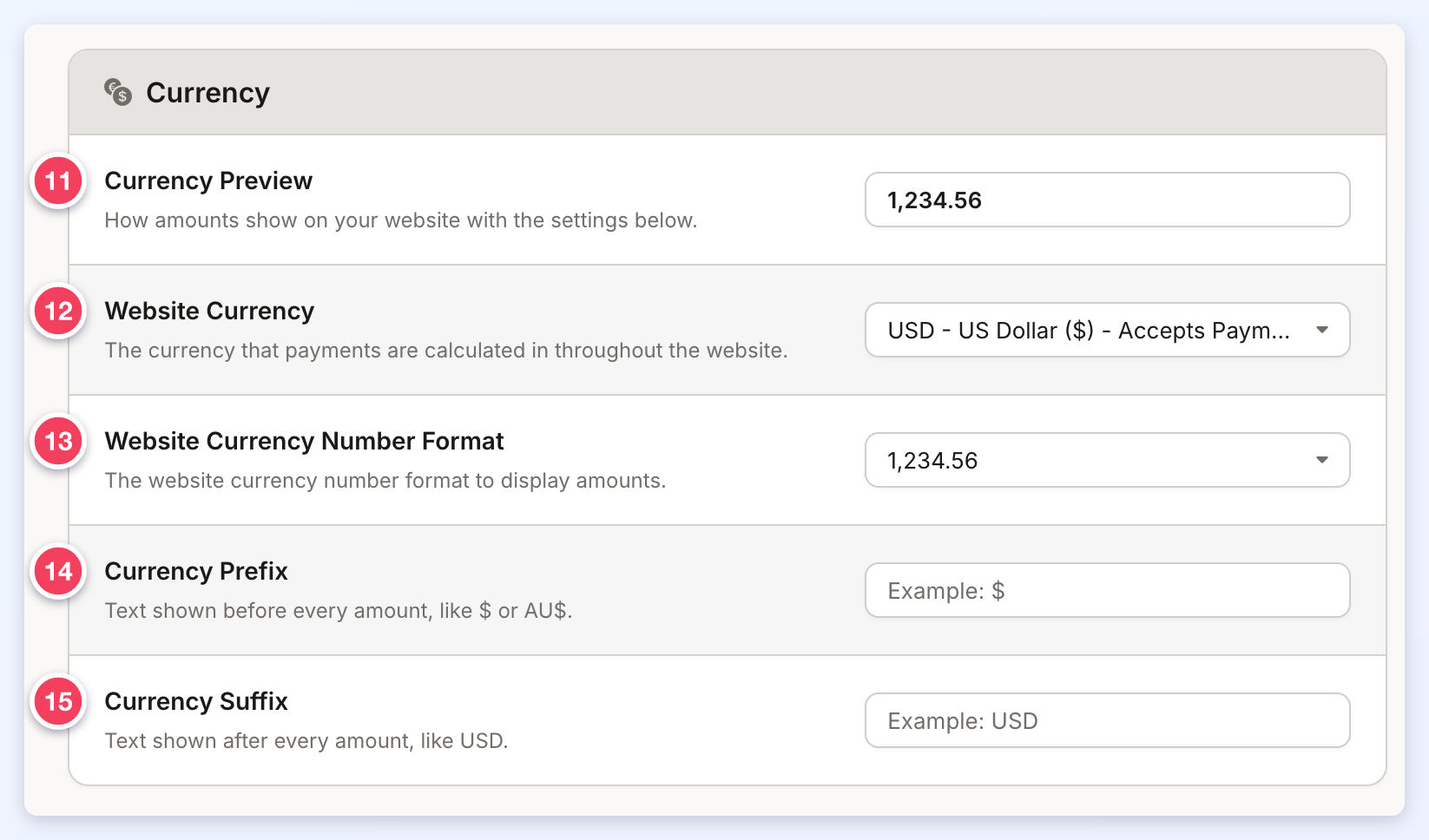
- Currency Preview: a sample amount showing how prices look with the settings below. It updates as the settings change, before they are saved.
- Website Currency: the currency members are charged in throughout the website. To charge members, a payment gateway must also be set up: Finance » Payment Settings - Setting Up A Payment Gateway. Click the box to open the list, and type to narrow it down; each currency shows its code, name and symbol. In the standard list, every currency is marked Accepts Payments. If the needed currency is not in the list, please contact the support team, who can turn on the full list of currencies below for the website.
- Website Currency Number Format: the order of digits, thousands separators and decimals: 1234.56, 1,234.56, 1.234,56 or 1,234. Countries write amounts differently, so pick the one the website's visitors expect.
- Currency Prefix: text shown before every amount, EG $ or AU$, as in AU$1,234.56.
- Currency Suffix: text shown after every amount, EG USD, as in 1,234.56 USD.
Full currency list (when turned on by the support team):
- ALL - Albania Lek (Lek)
- DZD - Algeria Dinar (دج)
- AOA - Angola Kwanza (Kz)
- ARS - Argentine Peso ($)
- AMD - Armenia Dram (֏)
- AWG - Aruba Guilder (ƒ)
- AUD - Australian Dollar ($)
- AZN - Azerbaijan New Manat (ман)
- BSD - Bahamas Dollar ($)
- BHD - Bahraini Dinar (.د.ب)
- BDT - Bangladesh Taka (৳)
- BBD - Barbadian Dollar ($)
- BYN - Belarusian Ruble (Br)
- BZD - Belize Dollar (BZ$)
- BMD - Bermuda Dollar ($)
- BOB - Bolivia Boliviano ($b)
- BAM - Bosnia and Herzegovina Convertible Marka (KM)
- BWP - Botswana Pula (P)
- BRL - Brazilian Real (R$)
- GBP - British Pound (£)
- BND - Brunei Darussalam Dollar ($)
- BGN - Bulgaria Lev (лв)
- BIF - Burundi Franc (FBu)
- KHR - Cambodia Riel (៛)
- CAD - Canadian Dollar ($)
- CVE - Cape Verde Escudo ($)
- XCG - Caribbean Guilder (Cg)
- KYD - Cayman Islands Dollar ($)
- XAF - Central African CFA franc (FCFA)
- CLP - Chilean Peso ($)
- CNY - Chinese Yuan (元)
- COP - Colombia Peso ($)
- KMF - Comoros Franc (CF)
- XPF - Comptoirs Français du Pacifique (CFP) Franc (F)
- CDF - Congo/Kinshasa Franc (FC)
- CRC - Costa Rica Colon (₡)
- HRK - Croatia Kuna (kn)
- CZK - Czech Koruna (Kč)
- DKK - Danish Krone (kr)
- DJF - Djibouti Franc (Fdj)
- DOP - Dominican Republic Peso (RD$)
- XCD - East Caribbean Dollar ($)
- EGP - Egyptian Pound (£)
- SVC - El Salvador Colon ($)
- ETB - Ethiopia Birr (Br)
- EUR - Euro (€)
- FKP - Falkland Islands (Malvinas) Pound (£)
- FJD - Fiji Dollar ($)
- GMD - Gambia Dalasi (D)
- GEL - Georgia Lari (ლ)
- GHS - Ghanaian Cedi (₵)
- GIP - Gibraltar Pound (£)
- GTQ - Guatemala Quetzal (Q)
- GNF - Guinea Franc (FG)
- GYD - Guyana Dollar ($)
- HTG - Haiti Gourde (G)
- HNL - Honduras Lempira (L)
- HKD - Hong Kong Dollar (元)
- HUF - Hungarian Forint (Ft)
- ISK - Icelandic Krona (kr)
- INR - Indian Rupee (₹)
- IDR - Indonesian Rupiah (Rp)
- ILS - Israeli Sheqel (₪)
- JMD - Jamaican Dollar (J$)
- JPY - Japanese Yen (local) (¥)
- JOD - Jordanian Dinar (د.أ)
- KZT - Kazakhstan Tenge (лв)
- KES - Kenyan Shilling (KSh)
- KGS - Kyrgyzstan Som (лв)
- LAK - Laos Kip (₭)
- LBP - Lebanese Pound (£)
- LSL - Lesotho Loti (L)
- LRD - Liberia Dollar ($)
- MOP - Macau Pataca (MOP$)
- MKD - Macedonia Denar (ден)
- MGA - Madagascar Ariary (Ar)
- MWK - Malawi Kwacha (MK)
- MYR - Malaysian Ringgit (RM)
- MVR - Maldives (Maldive Islands) Rufiyaa (.ރ)
- MRO - Mauritania Ouguiya (UM)
- MUR - Mauritius Rupee (₨)
- MXN - Mexican Peso ($)
- MDL - Moldova Leu (L)
- MNT - Mongolia Tughrik (₮)
- MAD - Moroccan Dirham (د.م)
- MZN - Mozambique Metical (MT)
- MMK - Myanmar currency (Ks)
- NAD - Namibian Dollar ($)
- NPR - Nepalese Rupee (₨)
- ANG - Netherlands Antilles Guilder (ƒ)
- NZD - New Zealand Dollar ($)
- NIO - Nicaragua Cordoba (C$)
- NGN - Nigeria Naira (₦)
- NOK - Norwegian Krone (kr)
- OMR - Omani Rial (﷼)
- PKR - Pakistani Rupee (₨)
- PAB - Panamanian Balboa (B/.)
- PGK - Papua New Guinea Kina (K)
- PYG - Paraguay Guarani (₨)
- PEN - Peru Nuevo Sol (S/)
- PHP - Philippine Peso (₱)
- PLN - Polish Zloty (zł)
- QAR - Qatari Riyal (﷼)
- RON - Romanian Leu (lei)
- RUB - Russian Rouble (ру)
- RWF - Rwanda Franc (FRw)
- STD - Sao Tome and Principe Dobra (Db)
- SHP - Saint Helena Pound (£)
- WST - Samoa Tala (WS$)
- SAR - Saudi Riyal (﷼)
- RSD - Serbia Dinar (Дин.)
- SCR - Seychelles Rupee (₨)
- SLL - Sierra Leone Leone (Le)
- SGD - Singapore Dollar ($)
- SBD - Solomon Islands Dollar ($)
- SOS - Somalia Shilling (S)
- ZAR - South African Rand (R)
- KRW - South Korean Won (₩)
- LKR - Sri Lankan Rupee (₨)
- SRD - Suriname Dollar ($)
- SZL - Swaziland Lilangeni (L)
- SEK - Swedish Krona (kr)
- CHF - Swiss Franc (CHF)
- TWD - Taiwan New Dollar (NT$)
- TJS - Tajikistan Somoni (TJS)
- TZS - Tanzania Shilling (TSh)
- THB - Thai Baht (฿)
- TTD - Trinidad and Tobago Dollar ($)
- TRY - Turkish Lira (₺)
- UGX - Uganda Shilling (USh)
- UAH - Ukraine Hryvna (₴)
- AED - United Arab Emirates Dirham (د.إ)
- UYU - Uruguay Peso ($U)
- USD - US Dollar ($)
- UZS - Uzbekistan Som (лв)
- VUV - Vanuatu Vatu (VT)
- VND - Viet Nam Dong (₫)
- XOF - West African CFA franc (CFA)
- YER - Yemen Rial (﷼)
- ZMW - Zambia Kwacha (Z$)
